The PgM² Programme Canvas addresses the needs of those who are looking for an effective and efficient way to organise brainstorming sessions and document their results around programme definition and planning for further analysis and discussion.

And although the PgM² Canvas can be easily filled in even by a single person, it is more effective to involve several team members or stakeholders from the beginning in order to capture a holistic programme perspective 

Why is it useful?

The PgM² Programme Canvas is particularly simple and easy to use and understood by all programme stakeholders. As a communication tool, it can be used both in face-to-face and virtual online communications.

It is also worth mentioning that PgM² Programme Canvas can be used throughout the programme. It can be used for visualising the programme, for high-level monitoring and controlling and re-planning, while at the end of the programme it can be used as a basis for the programme review and the identification of lessons learned. 

Note, however, that even for the smallest and simplest programmes, the PgM² Canvas is rarely adequate to replace all other programme management artefacts as it does not allow enough detail to be captured. Therefore, use the PgM² Canvas as a complementary tool to all other PgM² recommended artefacts. 
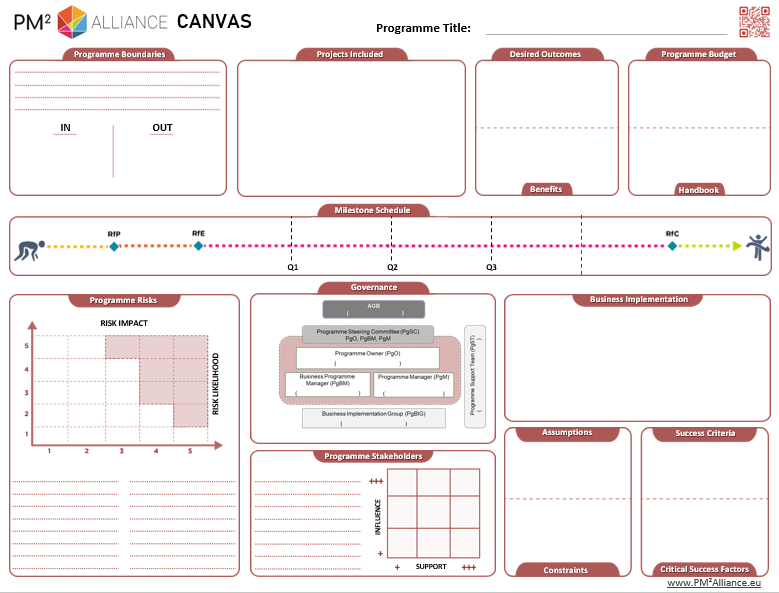
The PM² Programme Canvas can be tailored and used in various ways to enhance programme management and communication

  1. Programme kick-off workshops: The PgM² Canvas serves as a collaborative tool during programme kick-off meetings. It helps teams define the programme’s scope, identify dependencies and risks, and align on objectives and expected benefits. This ensures all stakeholders have a shared understanding from the start.
  2. Visual overview for stakeholders: The Canvas provides a concise, visual representation of the programme, making it ideal for stakeholder engagement. It can summarise key elements such as objectives, milestones, and risks, enabling quick, high-level insights without extensive documentation.
  3. Risk and stakeholder management workshops: Using the Canvas in workshops allows the team to collaboratively identify and assess programme risks and stakeholders. This facilitates the creation of mitigation strategies and ensures alignment on critical dependencies and stakeholder involvement.
  4. Coordination across programme components: A standardised Canvas format enhances clarity and coordination across interrelated projects and other workstreams. Teams can use it to communicate progress, share insights, and identify synergies effectively.
  5. Programme stage planning: Supports planning programme stages to focus on the incremental release of outcomes and benefits, ensuring value delivery.
  6. Tracking programme milestones: The Milestone Schedule section of the Canvas enables teams to track progress, mark completed phases, and adjust timelines. This ensures that critical programme milestones remain visible and achievable.
  7. Information radiator: Displaying the Canvas prominently in shared spaces or digital dashboards keeps the team aligned on programme priorities. Regular reference during meetings ensures focus on the most significant challenges and objectives.
  8. Training and development for programme teams: The Canvas acts as a practical training tool for new programme team members, helping them understand the interconnected elements of programme management and how to apply them effectively.
  9. Programme-End review and lessons learned: At programme closure, the Canvas can be revisited to evaluate how closely the actual outcomes aligned with initial goals, scope, and success criteria. It serves as a reflection tool to capture lessons for future programmes.

Interested in learning more?
Explore the PgM² Library space to find all PgM² assets. There you can find the PgM² Programme Canvas in printable PDF and PPTX editable format along with additional material that will be particularly useful for your programme.